Calem provides a connector to integrate with OPC/UA for sensors in the coming release of Calem R2025h (December 2025).
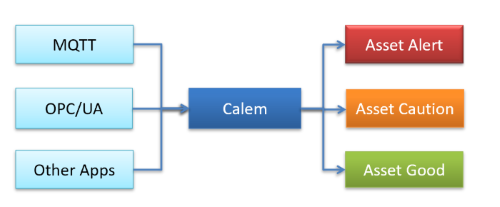
- OPC/UA (Open Platform Communications – Unified Architecture) is a standardized way for industrial devices to publish data for other systems to use.
- Calem OPC/UA connector allows Calem to get sensor readings from equipment and devices for asset health monitoring.
1. Calem OPC/UA Connector
Calem OPC/UA connector works with VPN and OPC/UA servers to get sensor readings.
- Calem OPC/UA connector is a Calem instance.
- It is configured in Calem Cloud for Calem Cloud customers, or installed in customer network environments for on-premise deployment.
- VPN setup may be necessary at the connector for accessing OPC/UA servers.
- The connector communicates with Calem Services via Calem API.
- See Calem Admin Guide for more info.
- Clients may contact Calem Team for help in setting up the connector.

2. Integrate OPC/UA with Calem Meters
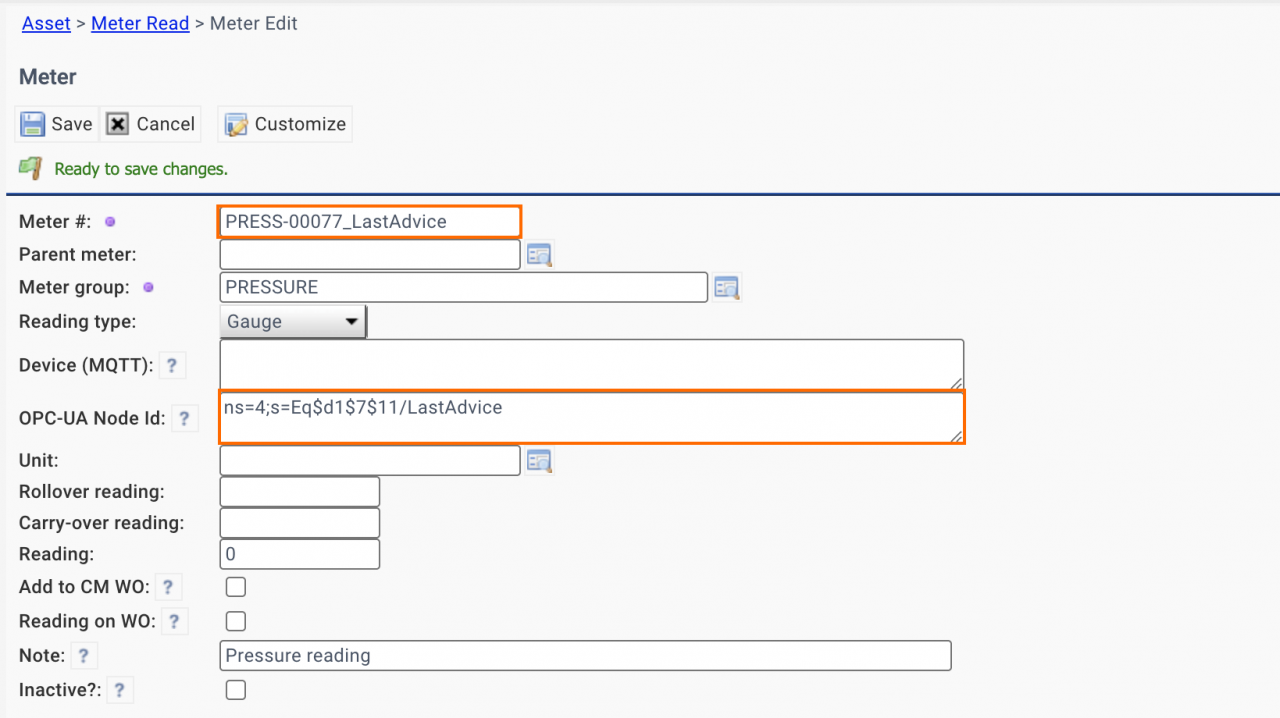
A sensor reading or an analysis score (from AI apps) in an OPC/UA server is integrated with an asset meter in Calem by its OPC/UA node Id. The "OPC-UA Node Id" of an asset meter will enable Calem to fetch data from OPC-UA servers. Here are the steps to integrate OPC/UA with Calem:
- Create a new asset meter for an OPC/UA sensor reading or analysis score at menu path: Asset | Asset List | Asset form | Meter tab.
- Set "OPC-UA Node Id" based on OPC/UA browser (discussed next).
- Calem uses the "OPC-UA Node Id" to query values from OPC/UA servers.

3. Integrate with Prosys OPC/UA Browser and Node Id
Prosys OPC/UA Browser is a free, generic OPC UA client application from Prosys OPC. It is an intuitive browser for you to connect to, explore, and interact with any OPC UA server. You can download it from https://prosysopc.com/products/opc-ua-browser/.
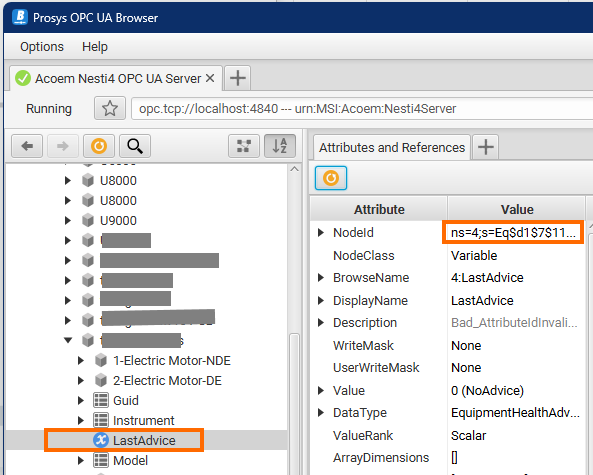
For instance, you want to integrate "LastAdvice" of an equipment. Here are the steps to do it with Prosys browser.
- Use Prosys browser to navigate to the equipment and "LastAdvice" node (screenshot below).
- Right-click the "NodeId" value (highlighted in the screenshot) in Prosys browser to copy its value. The NodeId value is "ns=4;s=Eq$d1...".
- Create an asset meter in your Calem (screenshot below).
- Set the "OPC-UA Node Id" to the value.
Additional Resources
- Bulk Update by Data Export and Uploa
- Calem Integration 1: Email & Misc Integration
- Calem Integration 2: REST API
- Calem Integration 3: Custom Triggers
- Calem Integration 4: Subscribing to Data Changes via REST API
- Calem Integration 5: Upsert REST API
- Calem Integration 6: Inbound Inventory Transactions
- Calem Integration 7: Asset Integration with MQTT
- Calem Enterprise Customization
- Custom Fields and Forms for User Skills
- List View Customization
- User Guide and Admin Guide (customer account required)
- Calem Enterprise Training Site
- Calem Enterprise Blogs
- Calem Enterprise Demo