A shared search can be made required in the coming release of Calem R2026. A required search cannot be removed by end users. One may create a limited data views through required searches. Here're the steps to set a search as required.
- An admin user with search admin permission can set up required searches. See this blog for more info.
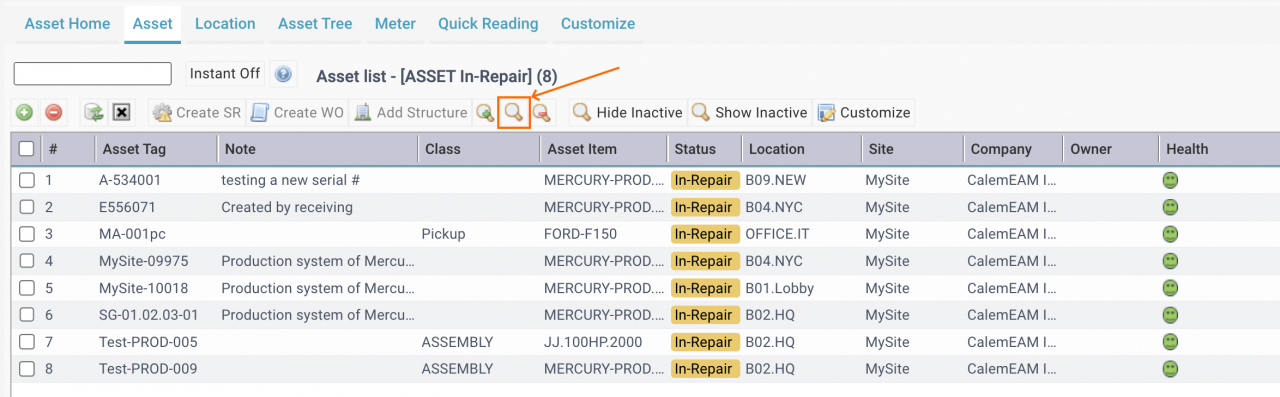
- Click "Search" button (screenshot below) to launch search screen.
- In the Shared Search list, check a search to be required. Then, click "Toggle Default" button (next screenshot).
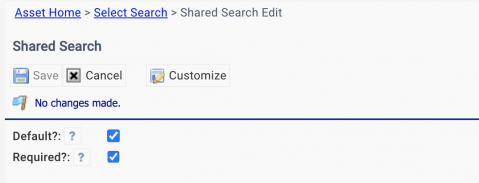
- An edit screen is shown, set "Required?" checked (next screenshot) to make a search required.
- Once a search is set as required, it will be enforced in a list view all the time. New searches in that list view will be performed in the context of the required search.
- A search may be made default, but not required. Default searches in list views are removed when new searches are performed.

Additional Resources
- Saved Searches in Calem
- How to Increase Productivity with Home Form
- Data Filtering/Search in Calem
- How to Search a Lookup Field by List of Values
- Add Free Text Search to a List View
- Expression in Free Text Search
- Saved Search in Calem
- List View Customization
- User Guide and Admin Guide (customer account required)
- Calem Enterprise Training Site
- Calem Enterprise Blogs
- Calem Enterprise demo