Calem Blogs
Blogs of CalemEAM
Feature Tip: Work Permit Life Cycle Control
Permit life cycle has been refactored in release R2026g (October 2026). The following roles are defined for permit life cycle control. The status diagram of permit life cycle is show below.
- Permit Approvers who are the issuers of permits. They review and approve permits.
- Permit Receivers who receive permits. They ack the receipt of permits and work on them.
- Permit Organizers who coordinate permit execution.
- Permit Planners who can edit permits without being assigned the roles above.
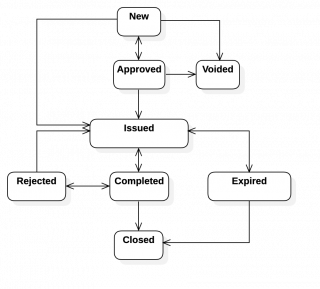
- A permit is created in New status (or inactive status previously).
- A permit may be approved before issuing to receivers.
- A permit may not require approval levels per configuration (Org | Settings |Permit Setting).
- Approved permits are issued by printing or by a permit edit event.
- A permit needs to be received by a receiver to be issued.
- Permit times (start and end) must be defined.
- An issued permit is turned into Expired status when end time is reached.
- A permit may be completed by a receiver, organizer, or issue approver.
- When a permit is checked to "Done" its status is moved to "Completed".
- Permit planners (Org | Settings | Monitor User) can act as an approver, organizer or receiver to edit a permit.
- It is possible to modify the status diagram and rules - See Calem Enterprise Admin Guid fore more info (a client account is required).
Duplicate permits per WO are not allowed by default.
- A system configuration is available to turn the control off so that duplicate permit templates can be created for a work order - see Admin Guide for more info. Clients of Calem Cloud may contact Calem to modify the configuration.
- This is useful when expiration is enforced and crews in different shifts may need same permits per WO.
- Additionally, standing WOs (WOs kept open) may be created for a category of work that requires permits. Same permits may be created from the standing WOs.
Permits may be created from permit list (Work Order | Codes | Permits).
- An open WO may be selected to create a permit.
- It makes it easier to manage permit creation and execution from a single list.
- It may be used with standing WOs to manage various permits that are not work order dependent.
Additional Resources
- Feature Tip: Work Permit Enhancements
- Steps to Delete Work Permits in Calem
- Introducing work Permit
- Integrating Permits into the Work Order Lifecycle
- Work Permits Notifications
- New Feature: Work Permit Approval and Status Tracking
- New Feature: Permit Requirement in Work Order Creation
- New Feature: General Work Permit Form Digitization
- Work Order Module Training
- User Guide and Admin Guide (customer account required)
- Calem Enterprise Training Site
- Calem Enterprise Blogs
- Calem Enterprise demo
About the author

Related Posts
By accepting you will be accessing a service provided by a third-party external to https://eam.calemeam.com/